Working with the Host Class#
Similar to the transient_objects.ipynb notebook, this will go through useful methods of the Host class. The general thing to keep in mind here is that we want to minimize the amount of data that OTTER stores locally for Hosts. This is because much of the data is already available in an easy format online. So, instead, we provide code to query those services for data on the hosts and just store host metadata.
We will start by setting up the OTTER dataset connection and pulling the Host information from the ASASSN-14li Transient object. If you are unsure what this means, we recommend you return to the transient_objects.ipynb notebook.
[1]:
# imports
import os
import otter
import matplotlib.pyplot as plt
[2]:
# connect to the dataset
db = otter.Otter()

# grab the host information for ASASSN-14li
t = db.query(names='ASASSN-14li')[0]
host = t.get_host()[0] # we can just take the last one

host
Attempting to login to https://otter.idies.jhu.edu/api with the following credentials:
username: user-guest
password: test
[2]:
SDSS J124815.23+174626.4 @ (RA, Dec)=(192.06249999999997 deg,17.77401111111111 deg)
Before we do anything else, you should take a look at the host attributes and methods with the documentation. The notable attributes are:
name: The name of the hostcoord: The astropy SkyCoord for this hostzorredshift: The redshift of this hosttransient_name: The default name from OTTER for the associated transientbibcodes: The references that say this is the host galaxy oftransient_name
So, as you can see, this has many methods to pull data from a wide variety of sources for this host galaxy! I will go through three here; querying simbad, ZTF forced photometry, and sparcl (for spectra).
Simbad#
Querying simbad will give you more meta information on the host, in case we are missing any in OTTER.
[3]:
host.query_simbad()
[3]:
| main_id | ra | dec | coo_err_maj | coo_err_min | coo_err_angle | coo_wavelength | coo_bibcode |
|---|---|---|---|---|---|---|---|
| deg | deg | mas | mas | deg | |||
| object | float64 | float64 | float32 | float32 | int16 | str1 | object |
| ZW VIII 211 | 192.06343876082 | 17.77402095173 | 0.1712 | 0.1079 | 90 | O | 2020yCat.1350....0G |
ZTF Forced Photometry#
The query_ztf method will pull all of the ZTF forced photometry for this Host. There are other services that will give you forced photometry like the query_asassn, query_ptf, and query_atlas methods. Most of these are easy and do not require authentication. But, please note, you need to set some special environment variables for querying ATLAS forced photometry.
[4]:
ztf_phot = host.query_ztf()
ztf_phot
[4]:
| oid | expid | hjd | mjd | mag | magerr | catflags | filtercode | ra | dec | chi | sharp | filefracday | field | ccdid | qid | limitmag | magzp | magzprms | clrcoeff | clrcounc | exptime | airmass | programid |
|---|---|---|---|---|---|---|---|---|---|---|---|---|---|---|---|---|---|---|---|---|---|---|---|
| int64 | int32 | float64 | float64 | float32 | float32 | int32 | str2 | float64 | float64 | float32 | float32 | int64 | int32 | uint8 | uint8 | float32 | float32 | float32 | float32 | float32 | float32 | float32 | int32 |
| 577108400005378 | 44831063 | 2458202.8161852155 | 58202.3106366 | 16.37723 | 0.015439002 | 0 | zg | 192.063438 | 17.7740715 | 2.716 | 0.277 | 20180325310625 | 577 | 8 | 4 | 20.85 | 26.241505 | 0.0337535 | -0.024271995 | 4.0729796e-05 | 30.0 | 1.072 | 1 |
| 577108400005378 | 44833559 | 2458202.841138935 | 58202.3355903 | 16.419819 | 0.0155790625 | 0 | zg | 192.0634047 | 17.7740339 | 2.877 | 0.218 | 20180325335579 | 577 | 8 | 4 | 20.9 | 26.23738 | 0.03151846 | -0.021219717 | 3.6010155e-05 | 30.0 | 1.042 | 1 |
| 577108400005378 | 45130554 | 2458205.811087029 | 58205.305544 | 16.422834 | 0.015589281 | 0 | zg | 192.0634317 | 17.7740395 | 2.272 | 0.102 | 20180328305521 | 577 | 8 | 4 | 20.21 | 26.258638 | 0.040733323 | -0.019816667 | 8.143837e-05 | 30.0 | 1.067 | 1 |
| 577108400005378 | 45131854 | 2458205.824084676 | 58205.3185417 | 16.42617 | 0.015600641 | 0 | zg | 192.0634323 | 17.7740673 | 2.819 | 0.159 | 20180328318530 | 577 | 8 | 4 | 20.3 | 26.264067 | 0.041553747 | -0.01758011 | 8.442703e-05 | 30.0 | 1.05 | 1 |
| 577108400005378 | 45629962 | 2458210.805131635 | 58210.2996296 | 16.441822 | 0.015654594 | 0 | zg | 192.0634537 | 17.7740789 | 1.981 | 0.149 | 20180402299468 | 577 | 8 | 4 | 19.75 | 26.169762 | 0.04299412 | -0.008474942 | 0.00015637281 | 30.0 | 1.056 | 1 |
| 577108400005378 | 45632116 | 2458210.826670778 | 58210.321169 | 16.468002 | 0.01574737 | 32768 | zg | 192.0634521 | 17.7740457 | 1.635 | 0.101 | 20180402321157 | 577 | 8 | 4 | 19.27 | 26.04908 | 0.049283765 | -0.020842288 | 0.0003108623 | 30.0 | 1.037 | 1 |
| 577108400005378 | 46028217 | 2458214.7876171353 | 58214.2821759 | 16.390034 | 0.015480272 | 0 | zg | 192.0633939 | 17.7741309 | 2.509 | 0.032 | 20180406282164 | 577 | 8 | 4 | 20.37 | 25.73719 | 0.04760029 | -0.011636164 | 0.00010886254 | 30.0 | 1.065 | 1 |
| 577108400005378 | 47329508 | 2458227.8001540815 | 58227.295081 | 16.373016 | 0.0154255815 | 0 | zg | 192.0633978 | 17.7740765 | 2.409 | 0.065 | 20180419295069 | 577 | 8 | 4 | 21.0 | 26.226395 | 0.032994743 | -0.01994036 | 3.9443865e-05 | 30.0 | 1.034 | 1 |
| 577108400005378 | 47633460 | 2458230.839557638 | 58230.3346065 | 16.440844 | 0.015651187 | 0 | zg | 192.0634178 | 17.7740803 | 3.118 | 0.266 | 20180422334595 | 577 | 8 | 4 | 21.69 | 26.210157 | 0.025991382 | -0.04899406 | 2.3768815e-05 | 30.0 | 1.082 | 1 |
| ... | ... | ... | ... | ... | ... | ... | ... | ... | ... | ... | ... | ... | ... | ... | ... | ... | ... | ... | ... | ... | ... | ... | ... |
| 1572215400026709 | 155830789 | 2459312.8132893397 | 59312.3078935 | 15.926317 | 0.013343082 | 0 | zr | 192.0634878 | 17.7740314 | 3.806 | 0.404 | 20210408307882 | 1572 | 15 | 4 | 21.59 | 26.310152 | 0.027659263 | 0.105552204 | 2.350647e-05 | 30.0 | 1.051 | 3 |
| 1572215400026709 | 157023746 | 2459324.7424926427 | 59324.2374653 | 15.9509535 | 0.013394092 | 0 | zr | 192.0634652 | 17.7740607 | 3.048 | 0.129 | 20210420237465 | 1572 | 15 | 4 | 20.77 | 26.269865 | 0.029191252 | 0.10533256 | 2.7050333e-05 | 30.0 | 1.083 | 2 |
| 1572215400026709 | 157023792 | 2459324.742955525 | 59324.2379282 | 15.909086 | 0.013308326 | 0 | zr | 192.0634262 | 17.7740245 | 4.364 | 0.331 | 20210420237928 | 1572 | 15 | 4 | 21.09 | 26.256872 | 0.02895346 | 0.11206503 | 2.616994e-05 | 30.0 | 1.083 | 3 |
| 1572215400026709 | 158922392 | 2459343.7279607314 | 59343.2239236 | 15.832029 | 0.013161831 | 0 | zr | 192.0634817 | 17.7740642 | 3.345 | 0.211 | 20210509223924 | 1572 | 15 | 4 | 21.67 | 26.220495 | 0.02971997 | 0.10488721 | 2.7938207e-05 | 30.0 | 1.051 | 2 |
| 1572215400026709 | 158922439 | 2459343.7284351992 | 59343.2243981 | 15.840847 | 0.0131778745 | 0 | zr | 192.0634497 | 17.7740663 | 3.974 | 0.385 | 20210509224398 | 1572 | 15 | 4 | 21.71 | 26.220335 | 0.027456189 | 0.11674291 | 2.385869e-05 | 30.0 | 1.051 | 3 |
| 1572215400026709 | 195320190 | 2459707.7060267725 | 59707.2019097 | 15.911115 | 0.013312379 | 0 | zr | 192.0634865 | 17.7740796 | 3.267 | 0.081 | 20220508201910 | 1572 | 15 | 4 | 20.6 | 26.284805 | 0.031224055 | 0.11465285 | 3.0734343e-05 | 30.0 | 1.067 | 2 |
| 1572215400026709 | 226340540 | 2460017.9108466255 | 60017.4054051 | 15.925154 | 0.013340711 | 32768 | zr | 192.0634879 | 17.7740955 | 2.279 | 0.331 | 20230314405394 | 1572 | 15 | 4 | 19.5 | 25.12099 | 0.049222887 | 0.12120484 | 9.146372e-05 | 30.0 | 1.061 | 2 |
| 1572215400026709 | 228833269 | 2460042.838102637 | 60042.3326968 | 15.956323 | 0.013405417 | 0 | zr | 192.063459 | 17.7741067 | 3.161 | 0.322 | 20230408332697 | 1572 | 15 | 4 | 19.46 | 25.769245 | 0.04868074 | 0.111889996 | 9.221749e-05 | 30.0 | 1.057 | 2 |
| 1572215400026709 | 230130518 | 2460055.8101903414 | 60055.3051852 | 15.904069 | 0.013298345 | 0 | zr | 192.0634863 | 17.7741079 | 2.844 | 0.462 | 20230421305174 | 1572 | 15 | 4 | 21.11 | 26.269793 | 0.02943827 | 0.1203238 | 2.7261045e-05 | 30.0 | 1.064 | 2 |
| 1572215400026709 | 230523637 | 2460059.7412128258 | 60059.2363773 | 15.909904 | 0.013309958 | 0 | zr | 192.0634857 | 17.7740972 | 3.704 | 0.424 | 20230425236366 | 1572 | 15 | 4 | 21.06 | 26.213598 | 0.027670497 | 0.12003717 | 2.4489718e-05 | 30.0 | 1.069 | 2 |
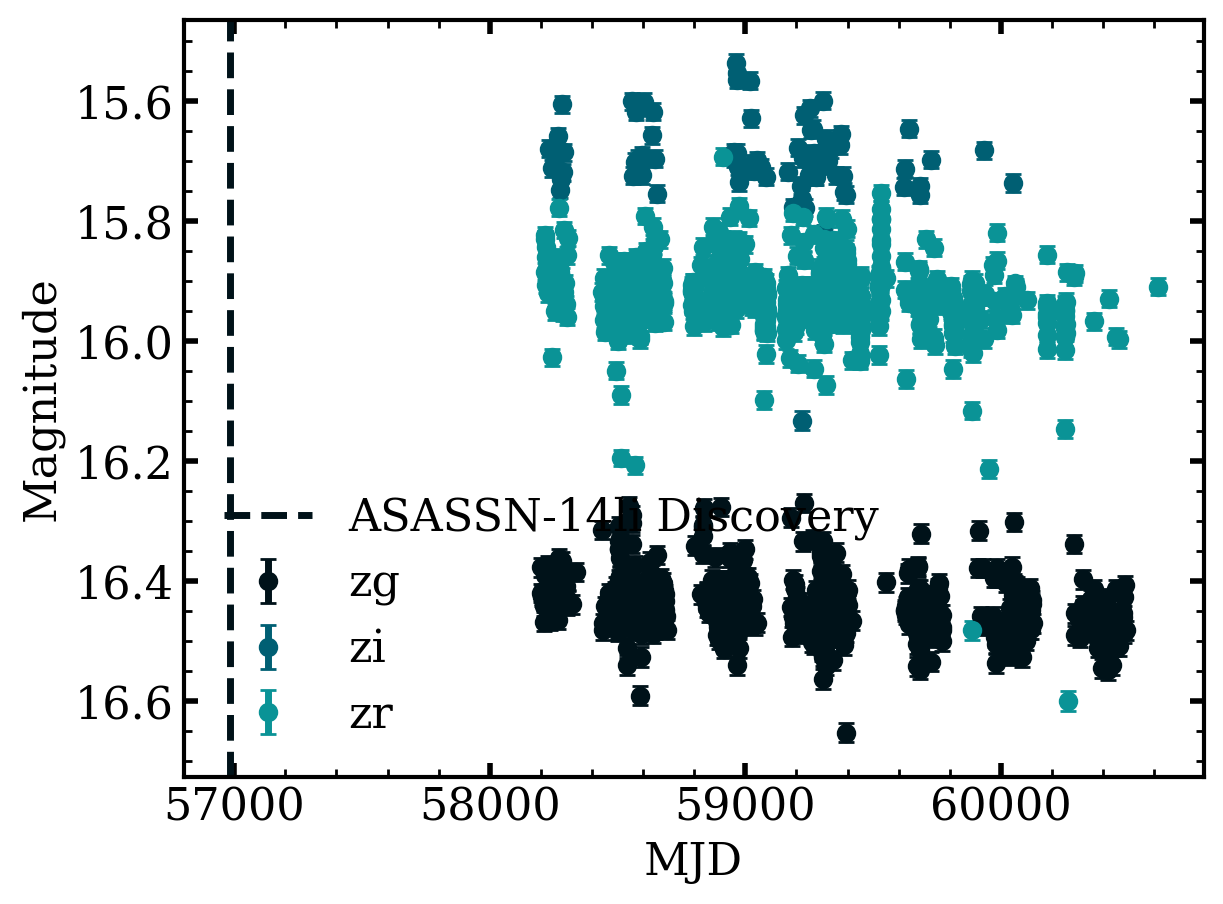
Which gives us a lot of time-series photometry for this host! Let’s plot the light curve, color coded by the filter. And, we can easily add a line for the discovery date of ASASSN-14li.
[5]:
fig, ax = plt.subplots()
for label, grp in ztf_phot.to_pandas().groupby('filtercode'):
    ax.errorbar(grp.mjd, grp.mag, yerr=grp.magerr, fmt='o', label=label)

ax.axvline(t.get_discovery_date().mjd, linestyle='--', label='ASASSN-14li Discovery')

ax.set_ylabel('Magnitude')
ax.set_xlabel('MJD')
fig.gca().invert_yaxis()
ax.legend();
Get Host Spectra#
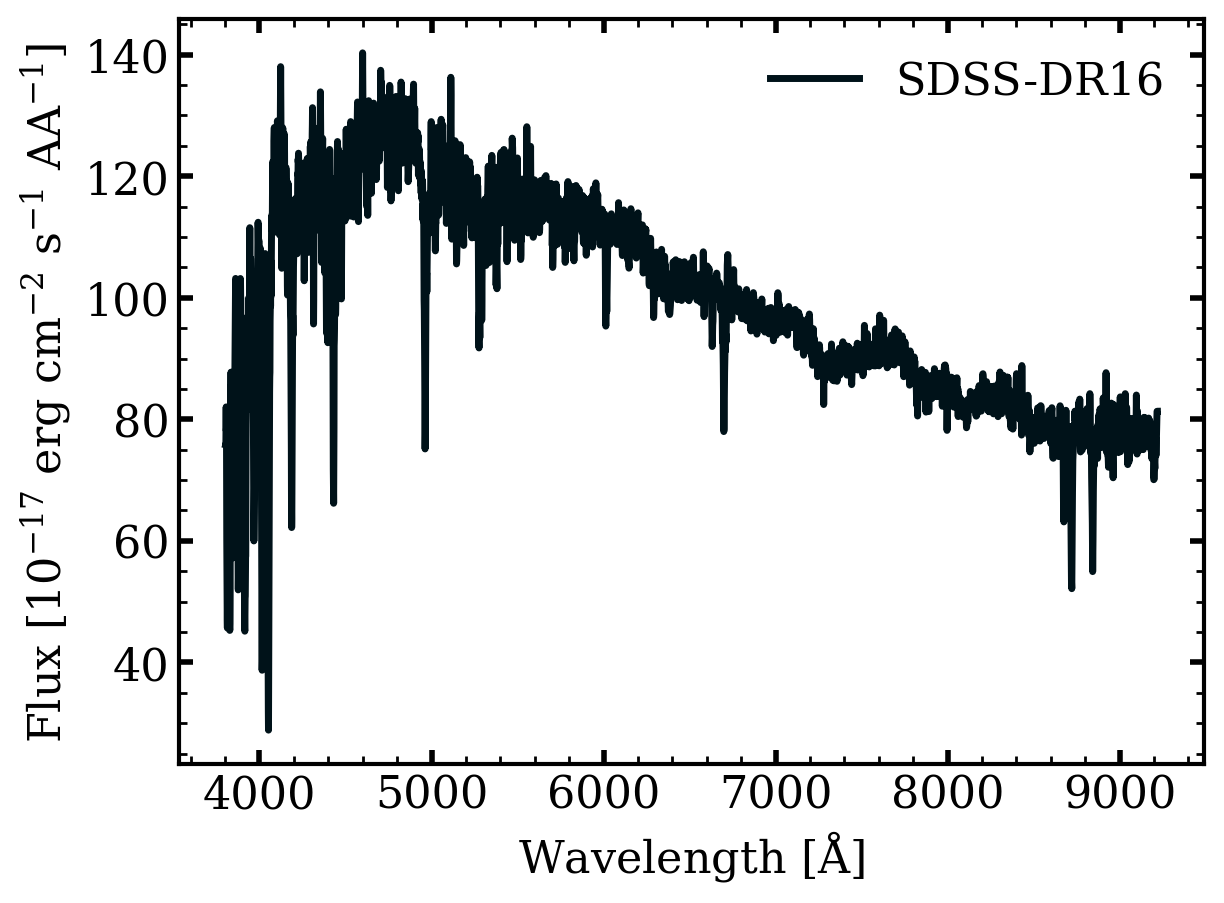
To get host spectra, we use the query_sparcl method which queries the SPARCL database. This will give an astropy table with columns for the wavelength and flux.
For a description of the columns see https://astrosparcl.datalab.noirlab.edu/sparc/sfc/
[6]:
spec = host.query_sparcl()
spec
[6]:
| sparcl_id | dec | ra | specid | flux | wavelength | _dr |
|---|---|---|---|---|---|---|
| str36 | float64 | float64 | int64 | object | object | str9 |
| 8aa3ea9d-a072-11ee-870c-525400ad1336 | 17.774016 | 192.06346 | 2928594919838738432 | [75.78482819 75.77787018 78.90979004 ... 78.68370819 81.32446289\n 81.32581329] | [3803.64520329 3804.5211258 3805.39725003 ... 9215.09888735 9217.22098659\n 9219.34357452] | SDSS-DR16 |
[7]:
fig, ax = plt.subplots()

for row in spec:
    ax.plot(row['wavelength'], row['flux'], label=row['_dr'])

ax.set_ylabel(r'Flux [$10^{-17}~erg~cm^{-2}~s^{-1}~AA^{-1}$]')
ax.set_xlabel(r'Wavelength [$\AA$]')
ax.legend();
[ ]: